


Growing a Software as a Service (SaaS) business requires more than attracting new customers and increasing revenue. Businesses must understand their financial performance, customer behavior, acquisition costs, and long-term profitability. This is where SaaS metrics calculators become valuable tools for making informed growth decisions.
SaaS metrics calculators help businesses measure important performance indicators such as Monthly Recurring Revenue (MRR), Annual Recurring Revenue (ARR), Customer Acquisition Cost (CAC), Customer Lifetime Value (LTV), Average Revenue Per User (ARPU), and customer churn rate. Instead of relying on assumptions, SaaS founders, marketers, and financial teams can use these calculations to identify opportunities, evaluate risks, and improve business performance.
Whether you operate a startup or manage an established subscription-based company, understanding SaaS growth metrics can help you allocate resources more effectively. In this guide, you will learn how to use SaaS metrics calculators, interpret their results, and turn data into practical growth strategies.

What Are SaaS Metrics Calculators?
SaaS metrics calculators are digital tools designed to calculate and analyze key performance indicators for subscription-based businesses. They use business data, such as revenue, customer numbers, marketing expenses, and subscription activity, to produce measurable results.
These calculators simplify financial analysis and make it easier to track business performance without performing complicated calculations manually.
For example, an MRR calculator can estimate your monthly recurring revenue, while a CAC calculator helps determine how much you spend to acquire each new customer. Similarly, an LTV calculator estimates the revenue a business may generate from a customer throughout the relationship.
Common SaaS metrics calculators include:
- MRR Calculator
- ARR Calculator
- CAC Calculator
- LTV Calculator
- ARPU Calculator
- Churn Rate Calculator
- Customer Retention Calculator
- LTV to CAC Ratio Calculator
- SaaS Growth Rate Calculator
- Conversion Rate Calculator
Each tool measures a different aspect of business performance. Using them together provides a clearer picture of revenue growth, customer acquisition efficiency, and long-term sustainability.
Why SaaS Metrics Matter for Growth Decisions
SaaS businesses operate on recurring revenue models, which makes customer retention, subscription expansion, and predictable income particularly important. Monitoring the right metrics helps businesses understand whether their growth strategies are producing sustainable results.
1. Make Data-Driven Decisions
Without reliable metrics, business owners may increase advertising budgets, launch new features, or change subscription prices based on assumptions. SaaS metrics calculators provide measurable information that supports more informed decisions.
For example, if customer acquisition costs increase while revenue per customer remains unchanged, your business may need to improve marketing efficiency or adjust its pricing strategy.
2. Improve Revenue Forecasting
Recurring revenue metrics help businesses understand their current financial position and estimate potential future income. MRR and ARR calculations can support budgeting, hiring plans, and investment decisions.
However, forecasts should also account for cancellations, upgrades, downgrades, and changes in customer acquisition.
3. Identify Customer Retention Problems
A growing customer base does not always mean a healthy business. If customers cancel subscriptions frequently, the company may struggle to maintain predictable revenue.
Churn and retention calculators help identify these patterns so businesses can investigate customer satisfaction, product usability, onboarding, and pricing concerns.
4. Measure Marketing Performance
CAC and LTV calculations help businesses evaluate whether customer acquisition spending is financially sustainable. By comparing acquisition costs with customer value, companies can identify channels that attract valuable customers rather than simply generating more sign-ups.
Essential SaaS Metrics Calculators Every Business Should Use
Understanding the purpose of each calculator helps you choose the right tools for your business goals.
1. Monthly Recurring Revenue (MRR) Calculator
Monthly Recurring Revenue measures the predictable subscription revenue a SaaS business earns each month.
Formula:
MRR = Number of Paying Customers × Average Monthly Subscription Revenue
For example, if a company has 200 paying customers who each pay $50 per month, its MRR is $10,000.
An MRR calculator helps businesses monitor revenue growth, evaluate subscription upgrades, and identify changes in recurring income.
Use this metric when reviewing monthly performance, setting revenue targets, or evaluating the impact of a new pricing plan.
2. Annual Recurring Revenue (ARR) Calculator
Annual Recurring Revenue represents the annualized value of recurring subscription revenue.
Formula:
ARR = MRR × 12
If your business generates $10,000 in MRR, its annualized recurring revenue is $120,000.
ARR is particularly useful for businesses with annual subscriptions and for strategic financial planning. Remember that ARR is an annualized revenue measure, not a guarantee of the revenue your company will actually collect over the next 12 months.
3. Customer Acquisition Cost (CAC) Calculator
Customer Acquisition Cost measures the average amount spent to acquire a new customer.
Formula:
CAC = Total Customer Acquisition Costs ÷ Number of New Customers Acquired
Suppose a SaaS company spends $6,000 on sales and marketing during a month and acquires 100 new customers. Its CAC is $60 per customer.
A CAC calculator helps businesses compare acquisition expenses across campaigns and marketing channels.
When calculating CAC, use a consistent reporting period and clearly define which costs are included. Depending on the purpose of the analysis, costs may include advertising, sales salaries, agency fees, and marketing software.
4. Customer Lifetime Value (LTV) Calculator
Customer Lifetime Value estimates the revenue or profit a business can generate from a customer over the entire customer relationship.
A simplified revenue-based formula is:
LTV = Average Revenue Per Customer per Month × Average Customer Lifespan in Months
For example, if a customer generates $50 in monthly revenue and remains subscribed for an average of 24 months, estimated revenue-based LTV is $1,200.
This calculation does not account for service delivery costs. For a profitability-focused analysis, use gross profit per customer rather than revenue.
An LTV calculator helps businesses evaluate retention strategies, pricing models, and customer acquisition spending.
5. LTV to CAC Ratio Calculator
The LTV to CAC ratio compares estimated customer lifetime value with customer acquisition cost.
Formula:
LTV to CAC Ratio = Customer Lifetime Value ÷ Customer Acquisition Cost
If estimated LTV is $1,200 and CAC is $300, the ratio is 4:1.
This means the estimated customer lifetime revenue is four times the acquisition cost. However, this does not mean the company earns four times its acquisition cost as profit because operating expenses and other costs still matter.
Many SaaS businesses use a ratio around 3:1 as a reference point, but an appropriate target depends on margins, payback period, growth stage, and customer retention.
6. Churn Rate Calculator
Customer churn rate measures the percentage of customers who cancel their subscriptions during a specific period.
Formula:
Customer Churn Rate = (Customers Lost During the Period ÷ Customers at the Beginning of the Period) × 100
If a business starts the month with 500 customers and loses 25, its monthly customer churn rate is 5%.
A churn rate calculator helps identify retention problems and evaluate whether customer success initiatives are effective.
For accurate comparisons, use consistent definitions and exclude newly acquired customers from the starting customer count.
7. Average Revenue Per User (ARPU) Calculator
ARPU measures the average revenue generated per user during a defined period.
Formula:
ARPU = Revenue During the Period ÷ Average Number of Users During the Period
For example, if a SaaS business earns $15,000 in monthly revenue from an average of 300 users, its monthly ARPU is $50.
ARPU helps businesses evaluate pricing performance, compare customer segments, and identify opportunities for upgrades or premium features.
Always specify whether the calculation uses all users, active users, or paying customers, because different definitions produce different results.
How to Use SaaS Metrics Calculators Step by Step
Using calculators effectively requires more than entering numbers and reading the result. Follow these steps to turn calculations into useful business decisions.
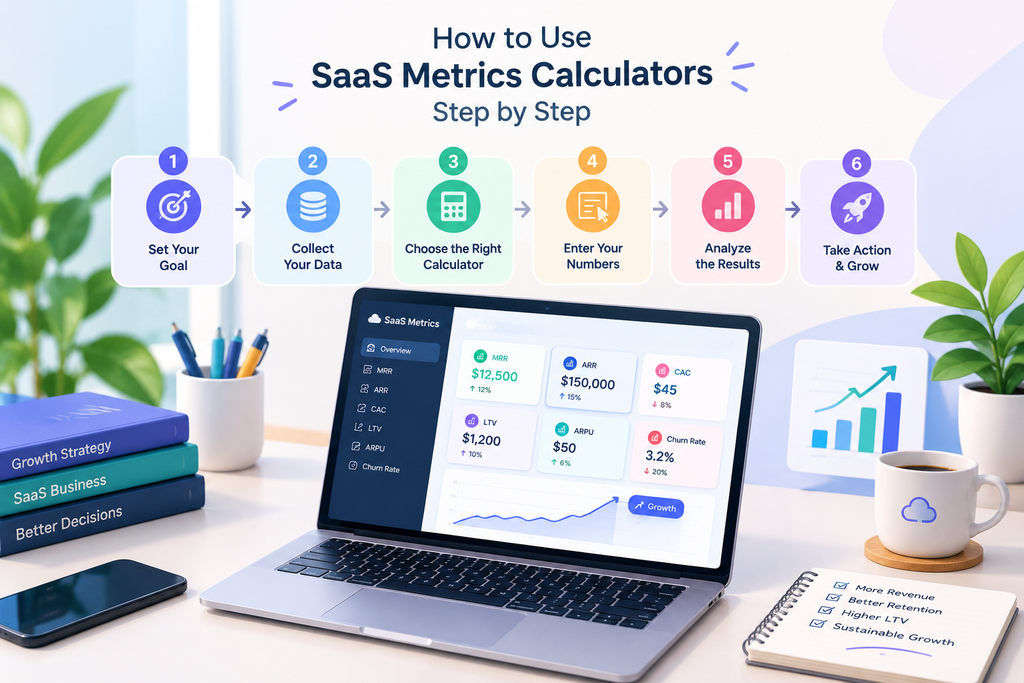
Step 1: Define Your Business Goal
Start by identifying the problem you want to solve. Your objective determines which metrics you should calculate.
For example:
- To improve revenue growth, track MRR and ARR.
- To reduce marketing expenses, calculate CAC.
- To improve customer retention, monitor churn rate.
- To evaluate customer profitability, compare LTV with CAC.
- To improve subscription monetization, analyze ARPU.
A clear objective prevents you from tracking unnecessary metrics.
Step 2: Collect Accurate Business Data
Gather reliable information from your subscription platform, billing system, analytics tools, and accounting records.
Depending on your chosen calculator, you may need monthly revenue, paying customer counts, acquisition expenses, cancellations, or customer lifespan estimates.
Use consistent reporting periods and avoid mixing monthly figures with annual figures unless the formula explicitly requires conversion.
Step 3: Choose the Appropriate Calculator
Select a calculator that directly relates to your objective. If you want to understand acquisition efficiency, begin with CAC. If you want to understand recurring revenue performance, use an MRR calculator.
For a broader analysis, combine multiple calculators to examine the relationship between revenue, customer acquisition, and retention.
Step 4: Enter Your Numbers Carefully
Input the required values and verify that they represent the same reporting period.
For example, when calculating monthly CAC, compare acquisition costs and newly acquired customers from the same month. When estimating LTV, use a clearly defined revenue or gross-profit measure and a realistic customer lifespan.
Incorrect inputs can produce misleading results even when the formula is mathematically correct.
Step 5: Analyze the Results
Compare your results with previous periods, internal targets, and relevant industry benchmarks.
An increase in MRR may indicate positive revenue momentum, while rising CAC could suggest that marketing campaigns are becoming less efficient.
Look for trends instead of relying on a single calculation. One month of unusual activity may not represent your business’s normal performance.
Step 6: Take Action and Measure the Impact
Use your findings to create a practical action plan. If churn is increasing, investigate cancellation reasons and improve onboarding. If CAC is too high, review campaign targeting and conversion rates.
After implementing changes, recalculate the relevant metrics to determine whether performance improves.
This process creates a continuous cycle of measurement, action, and evaluation.
How to Combine SaaS Metrics for Better Growth Decisions
Individual metrics provide useful information, but combining them reveals more about business performance.

Revenue Growth and Customer Retention
Review MRR alongside customer churn to understand whether revenue growth is sustainable. Rising MRR may hide customer losses if new subscriptions or upgrades compensate for cancellations.
Monitoring both metrics helps you distinguish genuine customer expansion from growth that depends heavily on replacing lost customers.
Customer Acquisition and Lifetime Value
Compare CAC with LTV to evaluate acquisition efficiency. A high LTV-to-CAC ratio can indicate that customer value comfortably exceeds acquisition spending, although gross margins and the time required to recover acquisition costs must also be considered.
A low ratio may suggest that acquisition spending is too high, pricing is too low, or customer retention needs improvement.
ARPU and Subscription Expansion
Monitor ARPU alongside MRR to understand how revenue per user changes over time. Increasing ARPU may result from price changes, premium-plan adoption, or additional subscriptions.
However, evaluate ARPU alongside churn and customer satisfaction to ensure that higher revenue per customer does not come at the expense of retention.
Common Mistakes to Avoid When Using SaaS Metrics Calculators
Even useful calculators can produce misleading conclusions when their results are interpreted incorrectly.
Using inconsistent data: Comparing revenue from one period with customer counts from another can distort calculations. Keep reporting periods consistent.
Ignoring gross margins: Revenue-based LTV does not represent profit. Include gross margins when assessing the economics of customer acquisition.
Relying on one metric: MRR growth alone cannot reveal whether acquisition costs or churn are becoming unsustainable. Review related metrics together.
Treating estimates as guarantees: LTV and customer lifespan are estimates based on historical behavior. Actual customer outcomes may differ.
Ignoring customer segments: Different plans, industries, and acquisition channels may have different retention and profitability patterns. Segment your analysis where possible.
Failing to take action: Calculating metrics without changing business decisions provides limited value. Establish targets, assign responsibilities, and review progress regularly.
Best Practices for SaaS Metrics Tracking
To get more value from SaaS metrics calculators, develop a consistent measurement process.
- Review key metrics regularly: Track important revenue and retention indicators weekly or monthly, depending on your business needs.
- Use consistent definitions: Document how your company calculates CAC, churn, ARPU, and LTV.
- Build a simple dashboard: Monitor a manageable set of indicators instead of overwhelming your team with unnecessary data.
- Compare trends over time: Review multiple reporting periods to identify meaningful changes.
- Set realistic targets: Use historical performance, customer behavior, and business goals to establish suitable benchmarks.
- Segment your data: Compare customer groups, subscription plans, and acquisition channels to discover opportunities.
- Validate calculator results: Check the inputs and formulas, especially when using simplified calculators for financial planning.
A reliable tracking process helps your team understand performance and respond to changing business conditions more confidently.
Conclusion
SaaS metrics calculators are valuable tools for understanding business performance and making better growth decisions. By measuring MRR, ARR, CAC, LTV, ARPU, and churn rate, SaaS companies can evaluate recurring revenue, improve customer acquisition, identify retention challenges, and assess the sustainability of their growth strategies.
The key is to use these tools as part of a broader decision-making process rather than treating individual results as complete answers. Start with a clear business objective, enter accurate data, compare related metrics, and use your findings to guide measurable improvements.
Whether you are managing a new SaaS startup or scaling an established subscription business, consistent metric tracking can help you make more informed decisions, allocate resources effectively, and build a stronger foundation for long-term growth.
Frequently Asked Questions (FAQs)
What are SaaS metrics calculators used for?
SaaS metrics calculators measure important subscription-business indicators, including recurring revenue, customer acquisition costs, customer lifetime value, average revenue per user, and churn rate. They help businesses evaluate performance and make informed decisions.
Which SaaS metrics should beginners track first?
Beginners can start with MRR, customer churn rate, CAC, and ARPU. As their reporting becomes more mature, they can add LTV, LTV-to-CAC ratio, and customer acquisition payback period.
How often should SaaS metrics be calculated?
Most SaaS businesses review core metrics monthly, while fast-growing companies may monitor selected indicators weekly or through automated dashboards. The appropriate frequency depends on business size, data availability, and decision-making needs.
Can SaaS metrics calculators improve profitability?
Yes. They can help businesses identify inefficient acquisition spending, retention problems, and pricing opportunities. Profitability improves when teams use these insights to make effective changes and monitor their results.
Are free SaaS metrics calculators useful?
Free calculators can be useful for quick estimates, learning formulas, and performing routine calculations. For advanced reporting, businesses may need integrated analytics, consistent financial data, and more detailed customer segmentation.
What is the most important SaaS growth metric?
There is no single metric that works for every business. MRR helps measure recurring revenue, CAC measures acquisition efficiency, LTV estimates customer value, and churn reveals retention performance. Evaluating these metrics together provides a more complete understanding of growth.






Leave a Reply