


Understanding how much revenue a business generates from each customer is essential for sustainable growth. Whether you operate a SaaS company, subscription-based business, mobile application, telecommunications service, or digital platform, measuring revenue per user helps you evaluate business performance and make informed decisions. This is where an ARPU calculator becomes useful.
An ARPU calculator helps businesses determine their Average Revenue Per User (ARPU) by comparing the revenue generated during a specific period with the number of active users during that same period. Instead of relying on assumptions, companies can use this metric to understand customer spending patterns, monitor revenue growth, and identify opportunities to improve monetization.
In this guide, you will learn what an ARPU calculator is, how average revenue per user is measured, which formula to use, and how businesses can apply ARPU insights to improve profitability and customer retention.

What Is an ARPU Calculator?
An ARPU calculator is a business measurement tool used to calculate the average revenue generated by each user over a defined period, such as a day, month, quarter, or year. ARPU stands for Average Revenue Per User, a commonly used performance metric in SaaS, telecommunications, media, gaming, and subscription-based industries.
The calculator typically requires two inputs: total revenue generated during a selected period and the number of active users during that same period. It then divides the revenue by the user count to estimate average revenue per user.
For example, if a software company generates $20,000 in monthly revenue from 1,000 active users, its monthly ARPU is $20.
Businesses use an ARPU calculator to:
- Measure revenue generated per active user.
- Compare monthly and quarterly revenue performance.
- Evaluate pricing strategies and subscription plans.
- Identify opportunities to increase customer spending.
- Monitor business growth and monetization efficiency.
- Support financial forecasting and marketing decisions.
An ARPU calculator is particularly helpful for businesses that want to understand whether revenue is growing because they are acquiring more users or because existing users are generating more revenue.
What Does Average Revenue Per User Mean?
Average Revenue Per User is the average amount of revenue a business earns from each user during a specific period. It provides a simple way to evaluate how effectively a company generates revenue from its user base.
ARPU is not necessarily the amount every customer pays. Some customers may purchase premium subscriptions, while others use free plans or spend very little. The metric combines the revenue included in the calculation and divides it by the defined user population.
For example, a SaaS business might have 500 users on a basic plan and 100 users on a premium plan. If total monthly revenue is $12,000 and all 600 users are included in the calculation, monthly ARPU is $20.
This metric helps businesses understand their overall revenue performance without analyzing every individual customer separately.
Why Is ARPU Important?
ARPU provides useful insights into monetization, customer value, and business performance. When monitored consistently, it helps organizations determine whether their products, pricing models, and customer segments are generating the expected revenue.
A rising ARPU may indicate that customers are upgrading to premium plans, purchasing additional services, or spending more on existing products. A declining ARPU may indicate a shift toward lower-priced plans, reduced customer spending, discounts, or changes in the user mix.
However, ARPU should not be interpreted in isolation. Businesses should also evaluate customer acquisition cost (CAC), customer lifetime value (LTV), churn rate, monthly recurring revenue (MRR), and customer retention to understand the bigger picture.
How to Calculate ARPU: The Basic Formula
The standard formula for calculating Average Revenue Per User is:
ARPU = Total Revenue ÷ Number of Active Users
To calculate ARPU accurately, use revenue and user data from the same period. If you calculate monthly ARPU, use monthly revenue and the corresponding monthly active-user count.
For example, suppose a subscription software company generates $30,000 in revenue during October and has 1,500 active users during that month.
- Total monthly revenue: $30,000
- Active users: 1,500
- Calculation: $30,000 ÷ 1,500
- Monthly ARPU: $20
This means the business generated an average of $20 per active user during October.
The formula is straightforward, but accurate results depend on consistent revenue definitions, reliable user counts, and a clearly defined measurement period.
How to Use an ARPU Calculator
Using an ARPU calculator is simple when you have accurate business data. Follow these steps to measure average revenue per user.
Step 1: Determine Your Total Revenue
Start by identifying the revenue generated during the period you want to measure. Depending on your business model, this might include subscription payments, product purchases, usage fees, or other qualifying revenue.
Use a consistent revenue definition. For example, decide whether your calculation includes discounts, refunds, taxes, advertising revenue, or one-time purchases. Different definitions can produce different ARPU figures.
Step 2: Count Your Active Users
Determine how many users belong in the calculation. For a monthly ARPU calculation, many businesses use monthly active users or paying users, depending on their reporting objective.
Do not automatically treat registered accounts, active users, paying customers, and subscribers as interchangeable. Each represents a different population.
Step 3: Choose the Measurement Period
Select a consistent time frame, such as a week, month, quarter, or year. Ensure that the revenue and user count refer to the same period.
Monthly ARPU is particularly useful for subscription businesses, while quarterly or annual ARPU can help identify longer-term revenue trends.
Step 4: Divide Revenue by Users
Enter your total revenue and active-user count into the calculator. Divide the revenue by the number of users included in your chosen definition.
For example, $15,000 in monthly revenue divided by 750 active users produces an ARPU of $20.
Step 5: Review and Compare the Result
Compare your current ARPU with previous periods to identify trends. Investigate whether changes are associated with pricing updates, customer upgrades, promotional discounts, churn, or changes in the number of active users.
Regular monitoring makes the ARPU calculator more valuable as a business performance tool.
Practical ARPU Calculation Examples
Understanding different scenarios makes it easier to apply the average revenue per user formula to your business.
Example 1: SaaS Business
A SaaS company generates $50,000 in monthly revenue from 2,500 active users.
ARPU = $50,000 ÷ 2,500 = $20
The company’s monthly ARPU is $20 per active user. Management can use this figure to compare subscription performance across different months.
Example 2: Mobile Application
A mobile application earns $8,000 from subscriptions and in-app purchases during a month. It has 4,000 monthly active users.
ARPU = $8,000 ÷ 4,000 = $2
The monthly ARPU is $2 per active user. The company can analyze whether subscriptions, premium features, or in-app purchases contribute most to revenue.
Example 3: Subscription Business
A subscription platform generates $24,000 in monthly revenue from 800 paying subscribers.
ARPU = $24,000 ÷ 800 = $30
Its average monthly revenue per paying subscriber is $30. This calculation measures revenue per paying subscriber rather than revenue per all active users, so it should be labeled accordingly.
Different Types of ARPU
Businesses can calculate ARPU in several ways depending on the audience they want to analyze and the decisions they need to make.
Monthly ARPU
Monthly ARPU measures average revenue per user over one month. It is useful for monitoring subscription revenue, pricing changes, and short-term monetization trends.
Quarterly ARPU
Quarterly ARPU measures average revenue per user over a three-month period. It helps businesses evaluate broader trends and reduce the influence of short-term fluctuations.
Annual ARPU
Annual ARPU measures average revenue per user over a year. It can help organizations compare annual performance and understand long-term revenue generation.
For a full-year calculation, divide annual revenue by the corresponding annual user measure, using a clearly defined methodology. Do not automatically divide annual revenue by the number of users at year-end if the user population changed substantially throughout the year.
ARPU for Paying Users
This version divides revenue by paying customers or subscribers. It helps subscription businesses understand the average revenue generated by customers who actually pay.
ARPU for All Active Users
This calculation includes the broader active-user population, potentially including free users. It can be useful for freemium applications and platforms where not every user generates direct revenue.
Always label the metric clearly because ARPU calculated using paying users can be substantially higher than ARPU calculated using all active users.
ARPU vs. ARPPU: What Is the Difference?
ARPU stands for Average Revenue Per User. It can include all active users within the chosen reporting definition, including free users when appropriate.
ARPPU stands for Average Revenue Per Paying User. It measures revenue generated by paying users only.
For example, a platform generates $10,000 from 2,000 active users, of whom 500 are paying customers.
- ARPU: $10,000 ÷ 2,000 = $5
- ARPPU: $10,000 ÷ 500 = $20
ARPU helps assess monetization across the broader user base, while ARPPU focuses on the revenue generated by customers who pay.
Neither metric is universally better. The right choice depends on the business model and the question you want to answer.
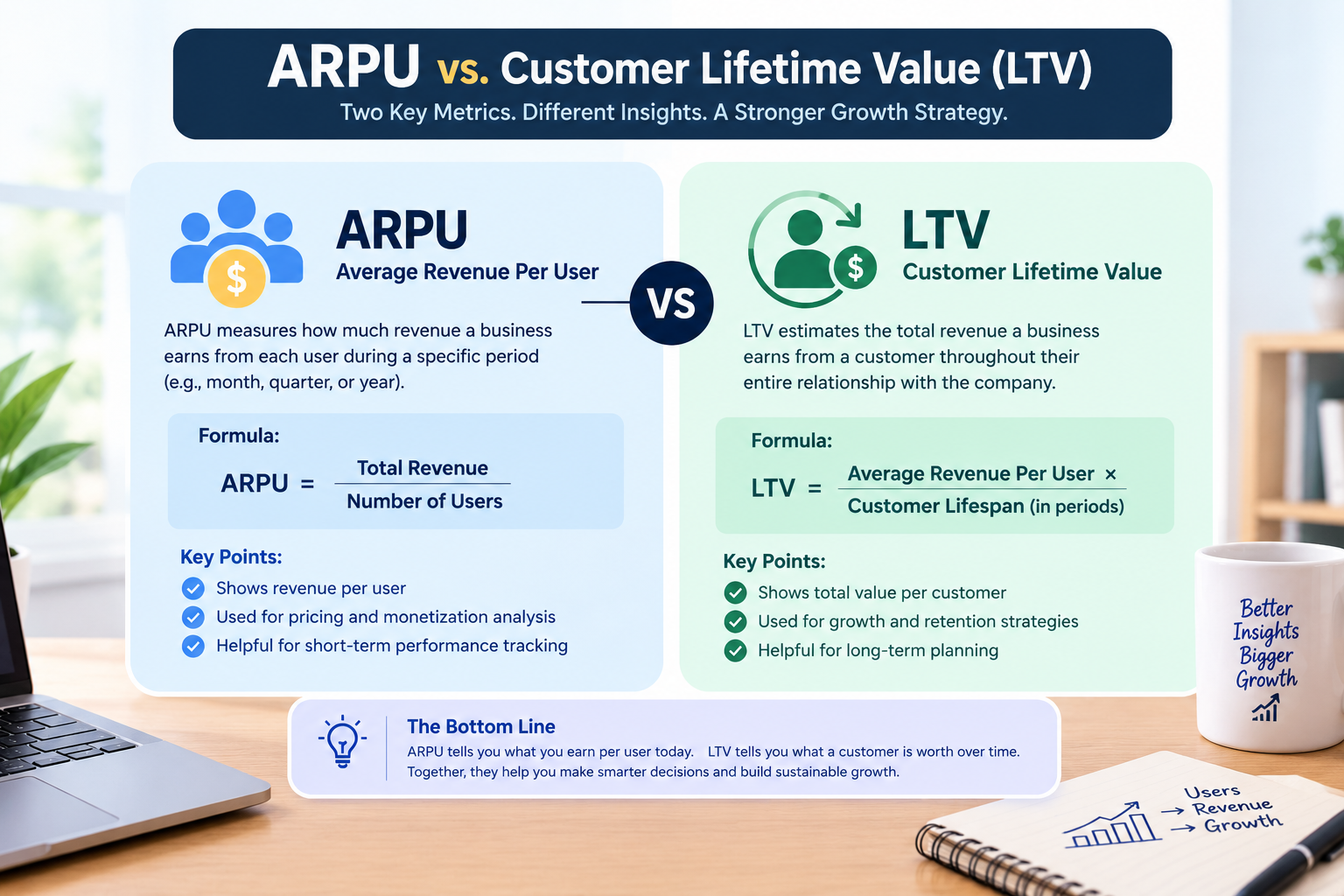
ARPU vs. Customer Lifetime Value (LTV)
ARPU and customer lifetime value are both useful business metrics, but they serve different purposes.
Customer lifetime value estimates the total value a customer generates over the duration of their relationship with a business.
For example, a monthly ARPU of $25 does not automatically mean customer lifetime value is $300. That estimate would assume a particular customer lifetime and consistent revenue, and it would still need to account for the selected LTV methodology.
Businesses can use ARPU alongside retention, churn, gross margin, and customer lifespan to build a more complete understanding of customer value.
What Is a Good ARPU?
There is no universal ARPU benchmark that applies to every business. A strong ARPU depends on industry, pricing, target audience, product value, customer mix, and monetization strategy.
A B2B SaaS company selling enterprise software may generate much more revenue per account than a free consumer application. Both could perform well within their respective business models.
Instead of comparing your ARPU with unrelated businesses, evaluate it against:
- Your historical ARPU performance.
- Your target revenue and growth objectives.
- ARPU across customer segments and subscription tiers.
- Customer acquisition cost and lifetime value.
- Customer churn and retention rates.
- Gross margin and overall profitability.
A high ARPU is not automatically a sign of success if customer acquisition costs are excessive or churn is increasing. Similarly, a lower ARPU can be sustainable when a business serves a large user base efficiently.
How to Improve Average Revenue Per User
Businesses can use ARPU insights to identify practical opportunities for revenue growth. The best approach is to increase customer value while maintaining a positive customer experience.
1. Optimize Your Pricing Strategy
Review whether your pricing structure reflects the value customers receive. Tiered pricing, usage-based pricing, and clearly differentiated subscription plans may help customers select an option that fits their needs.
Test pricing changes carefully and monitor conversion, retention, and customer feedback.
2. Offer Premium Features
Introduce additional functionality, higher usage limits, or specialized services for customers who need more value. Premium plans can increase average revenue when customers willingly upgrade.
3. Use Upselling and Cross-Selling
Recommend relevant upgrades or complementary products based on customer needs. For example, a B2B software provider might offer advanced reporting, additional integrations, or extra user seats.
Focus on genuine usefulness rather than encouraging unnecessary purchases.
4. Improve Customer Retention
Satisfied customers may remain subscribed longer and explore more of your products. Improve onboarding, customer support, product reliability, and educational resources to help users achieve their goals.
Retention improvements can support long-term revenue performance, although their effect on ARPU depends on how revenue and the active-user population change.
5. Segment Your Users
Analyze ARPU by acquisition channel, customer industry, subscription tier, geography, or account size when the data supports meaningful comparisons.
Segmentation can reveal which groups generate more revenue and which may benefit from different product experiences or pricing options.
6. Monitor Discounts and Promotions
Discounts can attract new customers, but excessive discounting may reduce average revenue per user. Track promotional performance and evaluate whether acquired customers remain engaged after the discount expires.
Common ARPU Calculation Mistakes to Avoid
An ARPU calculator provides useful information only when the inputs and methodology are consistent.
Mixing different periods: Dividing monthly revenue by an annual user count produces a misleading result.
Using inconsistent user definitions: Comparing paying subscribers in one month with all active users in another makes the trend difficult to interpret.
Ignoring revenue adjustments: Refunds, discounts, taxes, and one-time purchases can affect results. Define how each item is treated before comparing periods.
Confusing revenue with profit: ARPU measures revenue, not the amount left after operating expenses, service delivery costs, and other expenses.
Overlooking user mix: ARPU can decline because a company attracts more free users, even when total revenue increases.
Relying on one metric: ARPU should be evaluated alongside retention, churn, CAC, LTV, and other relevant business indicators.
Avoiding these mistakes helps teams make better decisions about pricing, acquisition, monetization, and growth.

Conclusion
An ARPU calculator is a practical tool for measuring Average Revenue Per User and understanding how effectively a business monetizes its user base. By dividing revenue for a defined period by the corresponding number of users, companies can track revenue trends, evaluate pricing strategies, compare customer segments, and identify growth opportunities.
For SaaS companies, subscription services, mobile applications, and B2B businesses, ARPU becomes more valuable when combined with customer acquisition cost, lifetime value, churn, and retention metrics. Consistent definitions and accurate data are essential for meaningful comparisons.
Ultimately, the goal is not simply to increase average revenue per user. It is to create sustainable revenue growth by delivering valuable products, improving the customer experience, and building long-term customer relationships.
Frequently Asked Questions (FAQs)
1. What is an ARPU calculator used for?
An ARPU calculator measures average revenue per user during a specific period. Businesses use it to evaluate monetization performance, monitor revenue trends, and assess pricing strategies.
2. What is the formula for ARPU?
The standard formula is: ARPU = Total Revenue ÷ Number of Users. Revenue and users must correspond to the same period and clearly defined user population.
3. How do you calculate monthly ARPU?
Divide the revenue generated during a month by the number of users included in your monthly ARPU definition. For example, $12,000 in monthly revenue divided by 600 active users equals $20 monthly ARPU.
4. Is ARPU the same as monthly recurring revenue?
No. Monthly recurring revenue (MRR) measures the recurring revenue a subscription business generates each month, while ARPU measures average revenue per user. In a consistent subscription business, monthly ARPU may be calculated by dividing MRR by the relevant monthly user or customer count.
5. What is the difference between ARPU and ARPPU?
ARPU measures average revenue per user under a defined user population, while ARPPU measures average revenue per paying user. ARPPU excludes users who do not pay.
6. Can ARPU be used for SaaS businesses?
Yes. SaaS companies use ARPU to evaluate subscription monetization, compare pricing tiers, monitor account revenue, and identify opportunities for upgrades and expansion.
7. Does a higher ARPU always mean better business performance?
No. Higher ARPU can indicate stronger monetization, but it should be evaluated alongside customer acquisition costs, churn, retention, gross margin, and profitability.
8. How often should businesses calculate ARPU?
Many subscription and SaaS businesses calculate ARPU monthly. Other organizations may review it weekly, quarterly, or annually depending on their business model and reporting needs.
9. What data is required for an ARPU calculator?
You generally need total revenue for a selected period, the number of users included in the calculation, and a consistent definition of revenue and active users.
10. How can a company increase ARPU?
A company may improve ARPU through value-based pricing, relevant premium features, upselling, cross-selling, better customer segmentation, and improved product value. These efforts should be balanced with customer satisfaction and retention.







Leave a Reply